
Corporate

- Top
- How to Use the Shareholder's Discount
Please check the usage requirements for the Shareholder's Benefit Discount Fare on the Shareholder's Benefit Discount Fare page.
Cautions When Using the "Shareholder's Benefit Number Guide"
To use the Shareholder's Benefit Discount Fare, you must register your shareholder number and registration password prior to the boarding procedure.
When you purchase the ticket, for example at a travel agency, you will need to register your shareholder's benefit number and registration password.
The airport counter is incredibly busy during weekends and extended holidays, such as Golden Week, Obon, and New Year's. Please cooperate by registering your shareholder's benefit number and registration password on the Solaseed Air website soon after purchasing the airplane ticket.
Register in advance and check in online from 24 hours up to 20 minutes before your scheduled departure.
【Valid until May 18, 2026】
Please register your "Shareholder Benefit Number" and "Registration Password" at the time of purchase or before completing check-in after purchase.
- Shareholder Benefit Validity Period
October 1, 2025 to May 18, 2026
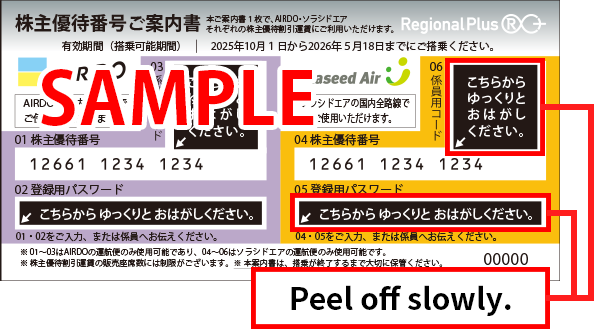
- Please peel off the sticker slowly.
- We will not collect the "Shareholder Benefit Number Notification Letter," but please keep it in a safe place until your flight is completed, even after registration.
- AIRDO's "Shareholder Benefit Number" and "Registration Password" can only be used with AIRDO. They cannot be used with Solaseed Air.
- If you make a reservation on the Solaseed Air website, you cannot purchase it through a travel agency.
【After May 19, 2026】
When purchasing airline tickets, please register your "Shareholder Benefit Number" and "Registration Password".
- Shareholder Benefit Validity Period
From May 19, 2026 to September 30, 2026
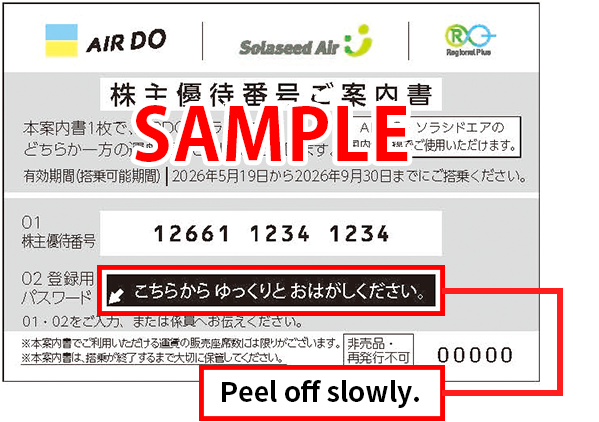
- Please peel off the sticker portion slowly.
- We will not collect the "Shareholder Benefit Number Notification Letter," but please keep it in a safe place until your flight is completed, even after registration.
- One "Shareholder Benefit Number Notification Letter" cannot be used for both AIRDO-operated flights and Solaseed Air-operated flights. Each letter is valid for flights operated by only one airline.
- If you make a reservation on the Solaseed Air website, you cannot purchase tickets through a travel agency.
How to Use the "Shareholder's Benefit Number Guide"
Boarding Procedure
Step 1: Reservation and purchase
This can be done starting on the selling date specified by our company.
Please reserve and purchase your ticket through the Solaseed Air website, through the Solaseed Air Reservation and Information Center, at an airport counter, or at a travel agency.
Please purchase your airplane ticket within four days, including the reservation date.
However, if you make the reservation between three days prior to the boarding date and the boarding date itself, you must purchase it at least 20 minutes prior to the departure time.
You cannot purchase the ticket at a travel agency if the reservation was made through the Solaseed Air website.
Please purchase your ticket through the Solaseed Air website (by credit card, at a convenience store, or using Pay-easy), through the Solaseed Air Reservation and Information Center, or at an airport counter.
Please reserve and purchase your ticket through the Solaseed Air website, through the Solaseed Air Reservation and Information Center, at an airport counter, or at a travel agency.
Please purchase your airplane ticket within four days, including the reservation date.
However, if you make the reservation between three days prior to the boarding date and the boarding date itself, you must purchase it at least 20 minutes prior to the departure time.
You cannot purchase the ticket at a travel agency if the reservation was made through the Solaseed Air website.
Please purchase your ticket through the Solaseed Air website (by credit card, at a convenience store, or using Pay-easy), through the Solaseed Air Reservation and Information Center, or at an airport counter.
Step 2: Registering your shareholder's benefit number and registration password
Please register through the Solaseed Air website, through the Solaseed Air Reservation and Information Center, at an airport counter*1, or at a travel agency*2.
*1 Newly issued tickets from the airport counter require registration at the time of purchase.
*2 Purchases made at travel agencies require registration at the same time.
*1 Newly issued tickets from the airport counter require registration at the time of purchase.
*2 Purchases made at travel agencies require registration at the same time.
- * Please register using the automatic check-in machine at the airport.
- *After May 19, 2026, you will need to register your "Shareholder Benefit Number" and "Registration Password" when purchasing airline tickets.
Step 3: Check in
Check in online from 24 hours up to 20 minutes before your scheduled departure.
Step 4: Boarding
Please complete boarding procedures and go through the security checkpoint at least 20 minutes before departure, and be at the boarding gate at least 10 minutes before departure.
How to Use Through the Solaseed Air Website
-
Reservations and Purchases
Check seat availability through the main page of the Solaseed Air website, and then reserve and purchase the Shareholder's Benefit Discount Fare.
- * Please use one of the following payment methods when using the Solaseed Air website.
Credit card / convenience store / Pay-easy
- * Please use one of the following payment methods when using the Solaseed Air website.
-
Registering the Shareholder's Benefit Number and Registration Password
Proceed to the 'Shareholder's benefit number registration' screen. Scratch the scratchable portion of the "Shareholder's Benefit Number Guide", and then enter (1) the shareholder's benefit number and (2) the registration password.
* Tear off the seal part slowly.* Keep the "Shareholder's Benefit Number Guide" somewhere safe even after registration, until you have finished boarding your flight.Shareholder's benefit number registration screenPC website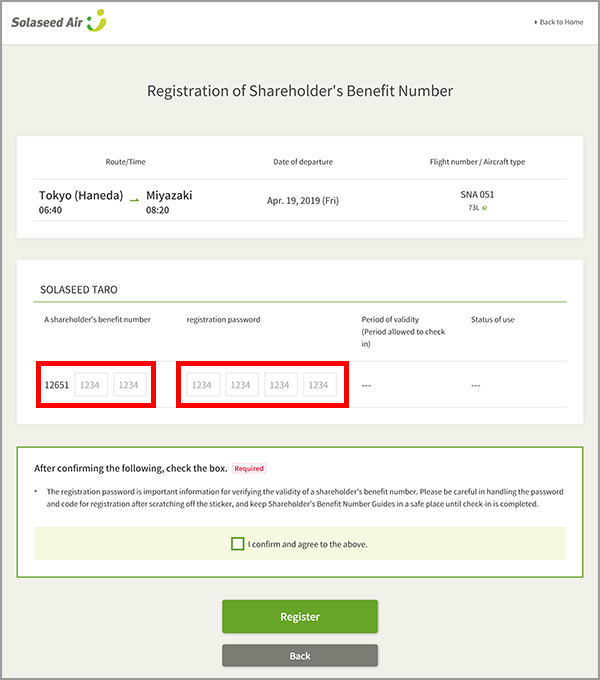
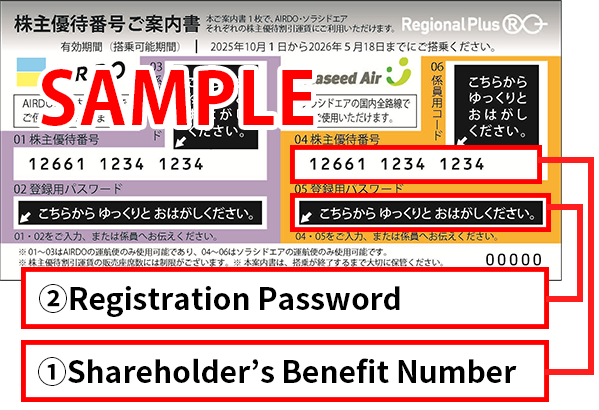 Smartphone website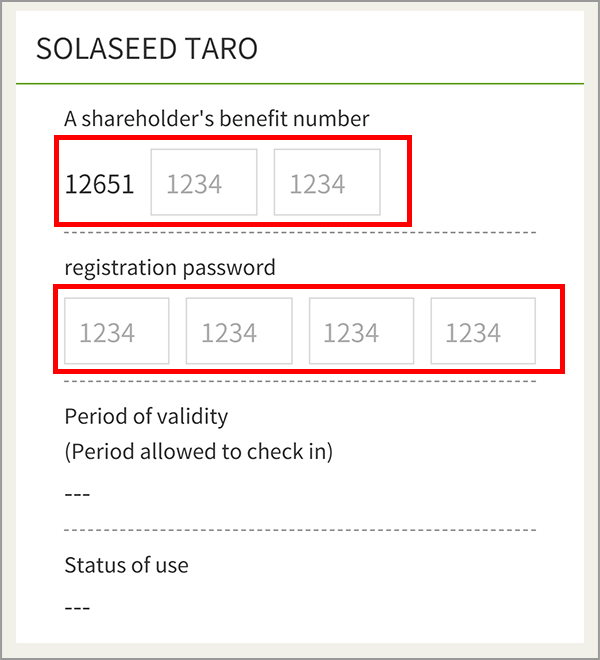
-
Reservation Changes and Refunds
- Reservation Changes
The reservation can be changed up to the expiration date printed on the "Shareholder's Benefit Number Guide". -
Refunds
Refunds can be requested through the Solaseed Air website*. If an airplane ticket is refunded after the shareholder's benefit number has been registered, then the shareholder's benefit number and registration password that were already registered can be reused as long as the shareholder's benefit number hasn't expired.
* Refundable airplane tickets are limited to tickets (unused) purchased through the Solaseed Air website or through the Solaseed Air Reservation and Information Center. - Reservation Changes
-
Searching for Shareholder's Benefit Numbers
A shareholder's benefit number and registration password that are reusable *due to a refund can be confirmed at a later date. Check using the 'Manage Reservations' link on the main page of the Solaseed Air website. When doing so, you will need the airplane ticket's authentication code (the confirmation code or the credit card number used to pay for the airplane ticket).
* This feature is unavailable in some instances.
Shareholder benefit information that has become available for use due to refunds, etc., can be checked via the “Shareholder Benefit Number Search”.
- * Shareholder benefit information searchable is limited to flights departing on or before May 18, 2026.