
Online Check-in
Online check-in enables you to check in and issue your boarding pass 24 hours up to 20 minutes before your scheduled departure after booking and purchasing your flight ticket.
Procedure for online check-in
Step 1: Reservation / purchase / seat selection

Please complete your reservation, purchase and seat selection.
We will send you an online check-in notification approximately 2 hours and 24 hours each before your scheduled departure.
To receive online check-in notifications, you need to sign up for "Flight Information Emails" on the Solaseed Air website.
- If your ticket was purchased at a special fare that requires the presentation of your personal identification document to show your age, or the like, you may not be eligible to check in online.
Step 2: Online check-in / issuing boarding pass
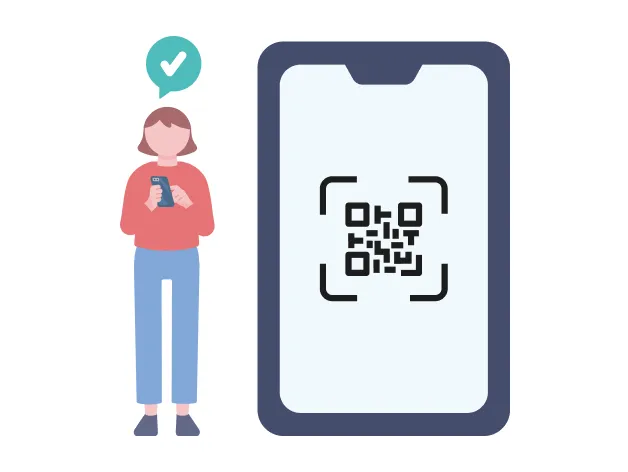
You are able to check in online 24 hours up to 20 minutes before your scheduled departure from your home or on your way.
Go to the Solaseed Air website to check in online and issue your boarding pass.
Boarding pass (the 2D barcode) can be obtained through the Solaseed Air website (PC and smartphone) and through our Email Notification Service.
To check in online, your reservation information (boarding date, flight number, passenger name) and confirmation number are required.
- When checking in online with the reservation number, you will need the credit card number (last 4 digits) used at the time of purchasing the ticket or the confirmation number.
- Infants who are not travelling on their own seat will need to issue boarding pass for a lap child.
- If you do not go through the security checkpoint at least 20 minutes prior to scheduled departure, you might not be able to board even if the reservation is complete.
- If you do not arrive at the boarding gate at least 10 minutes prior to scheduled departure, you might not be able to board even if the reservation is complete.
- At security, your carry-on baggage will be checked and your body may be searched. Please provide your full cooperation.
- The 2D barcode is the only means to let you go through security. You cannot pass through security checkpoints using IC cards, smartphones, or other devices with IC functions.
Boarding pass (the 2D barcode) can be obtained through the Solaseed Air website (PC and smartphone) and through our Email Notification Service.
- Except some reservations that are not eligible for online check-in
- Note that you cannot board your flight with the "e-Ticket Itinerary Receipt" displayed after purchasing your ticket on the Solaseed Air website.
- Presenting your authentication code is required even when you receive a refund on your flight ticket.
Points to be careful of on the use of your boarding pass that you obtained by your smartphone or sent through our Email Notification Service
- Bring your boarding pass to the airport by saving the screen display showing it or obtaining it through email.
- Note that you cannot board your flight with a printed copy of your boarding pass displayed on your smartphone.
- When you present your boarding pass on your smartphone with its backlight OFF or having a screen protector, it may not be scanned properly.
- Display the 2D barcode, flight information and passenger information on the screen of your smartphone. You may not be able to go through only with the 2D barcode displayed.
- The 2D barcode may appear small depending on the settings on certain smartphone models. If the 2D barcode cannot be scanned, the airport staff may ask you to operate your phone to change the size.
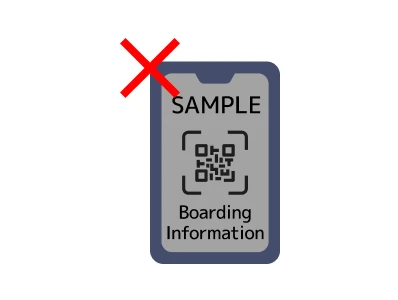
With the backlight OFF
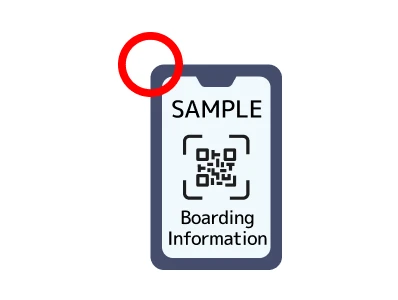
With the backlight ON
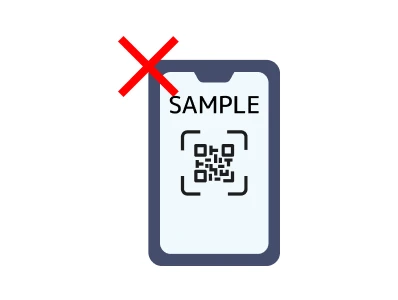
Screen only with the 2D barcode displayed
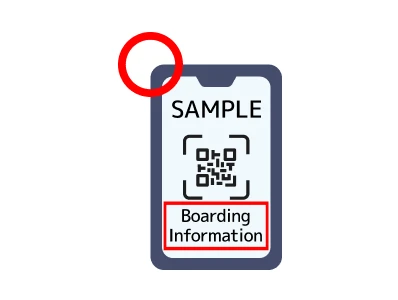
Display the 2D barcode and boarding information
Points to be carful of on the use of your boarding pass that you obtained by your PC
- Print your boarding pass and bring it on the day of your departure.
- Ensure that your printed boarding pass shows the 2D barcode.
- Your boarding pass must have the 2D barcode printed on it.
Cautions
- If you do not go through the security checkpoint at least 20 minutes prior to scheduled departure, you might not be able to board even if the reservation is complete.
- If you do not arrive at the boarding gate at least 10 minutes prior to scheduled departure, you might not be able to board even if the reservation is complete.
- At security, your carry-on baggage will be checked and your body may be searched. Please provide your full cooperation.
- The 2D barcode is the only means to let you go through security.
Authentication code is either the confirmation number you receive after purchasing a flight ticket or the number of your credit card used to pay for your flight ticket.
- Presenting your authentication code is also necessary when you receive a refund on your flight ticket.
Customers who booked through the Solaseed Air website or Reservation and Information Center
Payment with credit card
Please scroll horizontally
| Authentication code | Confirmation number |
|---|---|
| Where to find your authentication code (confirmation number) |
|
Payment at convenience store or using Pay-easy compatible ATM
Please scroll horizontally
| Authentication code | Confirmation number |
|---|---|
| Where to find your authentication code |
|
Customers who have reserved Mileage Saver Ticket
Please scroll horizontally
| Authentication code | Confirmation number |
|---|---|
| Where to find your authentication code |
|
Customers who booked at a travel agency (travel agency, ticket comparison website, etc.)
Please scroll horizontally
| Authentication code | Confirmation number |
|---|---|
| Where to find your authentication code |
|
- If you booked at a travel agency, your credit card number is not deemed as an authentication code even if the payment was made with your credit card. Your reservation or e-ticket number is required when checking in.
- If you forget to bring the authentication code, such as your confirmation number or your credit card, which is required for boarding, you will be asked to declare the reservation information of the person who is boarding and also present official identification documents*at the departure airport on the day of departure.
*Official identification documents
- Driver's License
- Passport
- Resident's Card (within 6 months from the date of issue)
- Citizen Card issued by ward, city, town or village
- National Pension Handbook (National Pension Number Notification Card)
- Physical Disability Certificate, War Injury Certificate, Rehabilitation Certificate, Mental Illness Certificate
- Residence Card (with Photo), Certificate of Alien Registration
- Basic Resident Register Card (with Photo)
- Individual Number Card (My Number Card / with Photo)
- Mariner's Pocket Ledger, Real Estate Transaction Specialist Certificate, Radio Operator Permit
- Other licenses or certificates issued by public institutions
- If the ticket was purchased with a credit card, we may also contact the credit card company for verification.
- If your identity cannot be verified, you will be asked to purchase a ticket for a fare that is available on the departure date.
- The originally purchased e-Ticket can be refunded within the applicable refund period. A refund handling fee (including any bank transfer fees for refunds to designated bank accounts) will apply.
Online check-in for connecting flight(s)
If your connecting flights are reserved as a single itinerary, you can check in online.Scan your boarding pass (the 2D barcode) to your final destination at the security checkpoint and board your flight. If the first flight segment is operated by Solaseed Air, you are able to check in online for your connecting flight 24 hours prior to your scheduled departure.
If your Solaseed Air flight is the second flight segment or subsequent, it is necessary for you to check in online from the official website of the airline (ANA, AIRDO, STARFLYER or ORIENTAL AIR BRIDGE) by which the first flight segment is operated, or from the Solaseed Air website 24 hours up to 20 minutes before the departure of your Solaseed Air flight.
However, if any of the followings applies, you cannot check in online and therefore you need to check-in at the airport counter.
- The customer's itinerary includes reservations for four or more flight routes.
- The customer's itinerary consists of separately reserved connecting flights (online check-in for each flight segment is available)
Online check-in enables you to check in and issue your boarding pass 24 hours up to 20 minutes before your scheduled departure after booking and purchasing your flight ticket.
Procedure for online check-in
Step 1: Reservation / purchase / seat selection
Please complete your reservation, purchase and seat selection.
We will send you an online check-in notification approximately 2 hours and 24 hours each before your scheduled departure.
To receive online check-in notifications, you need to sign up for "Flight Information Emails" on the Solaseed Air website.
- If your ticket was purchased at a special fare that requires the presentation of your personal identification document to show your age, or the like, you may not be eligible to check in online.
Step 2: Online check-in / issuing boarding pass
You are able to check in online 24 hours up to 20 minutes before your scheduled departure from your home or on your way.
Go to the Solaseed Air website to check in online and issue your boarding pass.
Boarding pass (the 2D barcode) can be obtained through the Solaseed Air website (PC and smartphone) and through our Email Notification Service.
To check in, you will need your "reservation number, first name, and last name," or your "e-ticket number, first name, and last name."
- Infants who are not travelling on their own seat will need to issue boarding pass for a lap child.
- If you do not arrive at the boarding gate at least 10 minutes prior to scheduled departure, you might not be able to board even if the reservation is complete.
- At security, your carry-on baggage will be checked and your body may be searched. Please provide your full cooperation.
- The 2D barcode is the only means to let you go through security. You cannot pass through security checkpoints using IC cards, smartphones, or other devices with IC functions.
Boarding pass (the 2D barcode) can be obtained through the Solaseed Air website (PC and smartphone) and through our Email Notification Service.
- Except some reservations that are not eligible for online check-in.
- Note that you cannot board your flight with the "e-Ticket Itinerary Receipt" displayed after purchasing your ticket on the Solaseed Air website.
- Presenting your authentication code is required even when you receive a refund on your flight ticket.
Points to be careful of on the use of your boarding pass that you obtained by your smartphone or sent through our Email Notification Service
- Bring your boarding pass to the airport by saving the screen display showing it or obtaining it through email.
- Note that you cannot board your flight with a printed copy of your boarding pass displayed on your smartphone.
- When you present your boarding pass on your smartphone with its backlight OFF or having a screen protector, it may not be scanned properly.
- Display the 2D barcode, flight information and passenger information on the screen of your smartphone. You may not be able to go through only with the 2D barcode displayed.
- The 2D barcode may appear small depending on the settings on certain smartphone models. If the 2D barcode cannot be scanned, the airport staff may ask you to operate your phone to change the size.
With the backlight OFF
With the backlight ON
Screen only with the 2D barcode displayed
Display the 2D barcode and boarding information
Points to be carful of on the use of your boarding pass that you obtained by your PC
- Print your boarding pass and bring it on the day of your departure.
- Ensure that your printed boarding pass shows the 2D barcode.
- Your boarding pass must have the 2D barcode printed on it.
Cautions
- At security, your carry-on baggage will be checked and your body may be searched. Please provide your full cooperation.
- If you do not arrive at the boarding gate at least 10 minutes prior to scheduled departure, you might not be able to board even if the reservation is complete.
- The 2D barcode is the only means to let you go through security.
The authentication code is the reservation number given to you when purchasing your flight ticket, or the e-ticket number.
- Presenting your authentication code is also necessary when you receive a refund on your flight ticket.
Customers who booked through the Solaseed Air website or Reservation and Information Center
Payment with credit card
Please scroll horizontally
| Authentication code | Reservation number, e-ticket number |
|---|---|
| Where to find your authentication code (confirmation number) |
|
Payment at convenience store or using Pay-easy compatible ATM
Please scroll horizontally
| Authentication code | Reservation number |
|---|---|
| Where to find your authentication code |
|
Customers who have reserved Mileage Saver Ticket
Please scroll horizontally
| Authentication code | Either reservation or e-ticket number |
|---|---|
| Where to find your authentication code |
|
Customers who booked at a travel agency (travel agency, ticket comparison website, etc.)
Please scroll horizontally
| Authentication code | Either reservation or e-ticket number |
|---|---|
| Where to find your authentication code |
|
-
If you booked at a travel agency, your credit card number is not deemed as an authentication code even if the payment was made with your credit card. Your reservation or e-ticket number is required when checking in.
Either reservation or e-ticket number
-
If you forget to bring your confirmation number, credit card, etc., you will be asked to declare the reservation information of the person who is boarding and also present official identification documents(*) at the airport on the day of departure.
*Official identification documents
- Driver's License
- Passport
- Resident's Card (within 6 months from the date of issue)
- Citizen Card issued by ward, city, town or village
- National Pension Handbook (National Pension Number Notification Card)
- Physical Disability Certificate, War Injury Certificate, Rehabilitation Certificate, Mental Illness Certificate
- Residence Card (with Photo), Certificate of Alien Registration
- Basic Resident Register Card (with Photo)
- Individual Number Card (My Number Card / with Photo)
- Mariner's Pocket Ledger, Real Estate Transaction Specialist Certificate, Radio Operator Permit
- Other licenses or certificates issued by public institutions
- If the ticket was purchased with a credit card, we may also contact the credit card company for verification.
- If your identity cannot be verified, you will be asked to purchase a ticket for a fare that is available on the departure date.
- The originally purchased e-Ticket can be refunded within the applicable refund period. A refund handling fee (including any bank transfer fees for refunds to designated bank accounts) will apply.
Online check-in for connecting flight(s)
If your connecting flights are reserved as a single itinerary, you can check in online. Scan your boarding pass (the 2D barcode) to your final destination at the security checkpoint and board your flight. If the first flight segment is operated by Solaseed Air, you are able to check in online for your connecting flight 24 hours prior to your scheduled departure.
If your Solaseed Air flight is the second flight segment or subsequent, it is necessary for you to check in online from the official website of the airline (ANA, AIRDO, STARFLYER, ORIENTAL AIR BRIDGE, or IBEX AIRLINES) by which the first flight segment is operated, or from the Solaseed Air website 24 hours up to 20 minutes before the departure of your Solaseed Air flight.
However, if any of the followings applies, you cannot check in online and therefore you need to check-in at the airport counter.
- The customer's itinerary consists of separately reserved connecting flights (online check-in for each flight segment is available)