
Standby at Airport
Procedure for Standby
STEP 1 : Application for the standby list on the Solaseed Air website
Application for the standby list is available from 0:00 a.m. on the day of scheduled boarding.
Proceed from the "application for standby list"
button below.
On the "application for standby list" screen, select
all the flights you wish to be included in the standby
list.
In the case of the open ticket, which is purchased
without reservation of the flight, airport standby
ticket (2D barcode) is issued after completion of
application for the standby list.
You can check the number of people on the standby list and standby status below:
- Make application after purchasing the flight ticket in advance. There are 2 types of fare that allow application for the standby list: Some fares that allow reservation change; open tickets that are purchased without reserving a specific flight.
- Application for the standby list is available only for the day of boarding.
- If you have reserved the flight of the desired day, apply for the standby list of the flight you wish to change after completing the online check-in for the reserved flight.
- You cannot apply for the standby list of the flight that departs later than the one you have reserved.
- If you wish to apply for the standby list of the connecting flight on the day, ask the airport counter. (You cannot apply for the standby list of the connecting flight from the Solaseed Air website.)
- Make sure to save the standby number written on the airport standby ticket, because you will need it for making reference or for confirmation when the seat becomes available.
STEP 2 : Pass through the security checkpoint after applying for the standby list
In the case of standby of the flight earlier than that of the reserved flight
Hold the boarding pass (2D barcode) of the reserved flight over the reader at the security checkpoint after undergoing the online check-in for the reserved flight.
In the case of standby after purchasing the open ticket
Hold the airport standby ticket (2D barcode), which was issued after completion of application for the airport standby list, over the reader at the security checkpoint.
-
If you have applied for the standby list using a
flight ticket other than the one you hold over at
the security checkpoint at the departing airport,
please inform the staff. (*)
(*) For example, in the cases such as reserving the connecting flight separately and applying for the standby list of the connecting flight.
STEP 3 : Standby check-in after announcement
Digital signage set near the boarding gate shows
the first 3 letters of the name and standby
number of the customers whose seat becomes
available. The names and numbers will be shown
by flight.
If the letters of your name and your standby number
are displayed, undergo the standby check-in on the
Solaseed Air website.
Announcement time
The announcement starts 20 minutes before the departure time of the flight you wish to be included in the standby list.
Checked baggage
If you wish to check in the baggage, bring it to the
boarding gate or baggage counter after informing the
staff.
If you check in a pet, pay the pet fee
at the hand baggage counter before passing through
the security checkpoint.
How to announce the passengers on the standby list
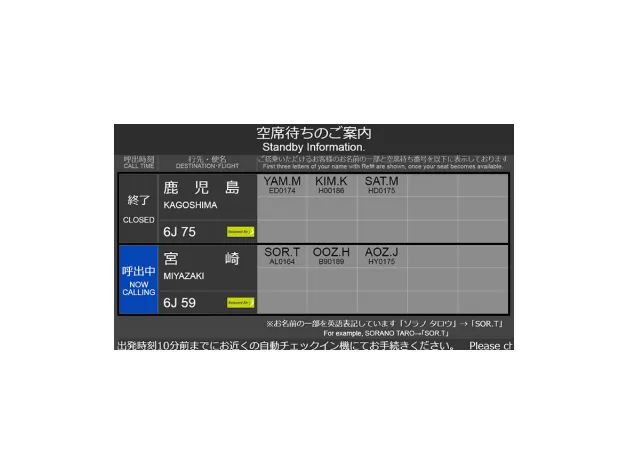
Example of digital signage
Digital signage set near the boarding gate
shows the first 3 letters of the name and
standby number of the customers whose seat
becomes available.
If the letters of your name and your standby number
are displayed, undergo the standby check-in on
the Solaseed Air website.
- Even though the letters of your name and your standby number are displayed, you cannot board unless you undergo the standby check-in on the Solaseed Air website.
- Inform the staff if you cannot undergo the online check-in with your ticket. The staff will undergo the procedures.
Order of announcing the name and number on the standby list
Order of announcing the name and number on the
standby list changes according to the standby
category.
Category
G: General customers
H: Other (complimentary flight ticket [list], etc.)
- Announcement of the customers of the cancelled flight may be prioritized.
Procedure for Standby
STEP 1 : Application for the standby list on the Solaseed Air website
Application for the standby list is available from 0:00 a.m. on the day of scheduled boarding.
Proceed from the "application for standby list"
button below.
On the "application for standby list" screen, select
all the flights you wish to be included in the standby
list.
You can check the number of people on the standby list and standby status below:
- Make application after purchasing the flight ticket in advance. If you do not have a flight ticket for the day of your departure, you will not be able to be placed on the standby list. Only some of the fares, which allow changes to the reservation, allow you to make an application for the standby list.
- Application for the standby list is available only for the day of boarding.
- If you have reserved the flight of the desired day, apply for the standby list of the flight you wish to change after completing the online check-in for the reserved flight.
- You cannot apply for the standby list of the flight that departs later than the one you have reserved.
- If you wish to apply for the standby list of the connecting flight on the day, ask the airport counter. (You cannot apply for the standby list of the connecting flight from the Solaseed Air website.)
- Make sure to save the standby number written on the airport standby ticket, because you will need it for making reference or for confirmation when the seat becomes available.
STEP 2 : Pass through the security checkpoint after applying for the standby list
Hold the boarding pass (2D barcode) of the reserved flight over the reader at the security checkpoint after undergoing the online check-in for the reserved flight.
-
If you have applied for the standby list using a
flight ticket other than the one you hold over at
the security checkpoint at the departing airport,
please inform the staff. (*)
(*) For example, in the cases such as reserving the connecting flight separately and applying for the standby list of the connecting flight.
STEP 3 : Standby check-in after announcement
If the letters of your name and your standby number are displayed, you will receive an email informing you that your desired flight is successfully reserved. Please access the URL stated in the email, obtain your boarding pass for the flight you won, and board the flight.
Announcement time
The announcement starts 20 minutes before the departure time of the flight you wish to be included in the standby list.
Checked baggage
If you wish to check in the baggage, bring it to the
boarding gate or baggage counter after informing the
staff.
If you check in a pet, pay the pet fee
at the hand baggage counter before passing through
the security checkpoint and bring your pet to the
boarding gate.
How to announce the passengers on the standby list
Example of digital signage
Digital signage set near the boarding gate
shows the first 3 letters of the name and
standby number of the customers whose seat
becomes available.
If the letters of your
name and your standby number are displayed,
undergo the standby check-in on the Solaseed
Air website.
- If your desired flight is successfully reserved, you will be automatically checked in. You cannot board unless you access the URL stated in the email and obtain your boarding pass.
- Inform the staff if you cannot undergo the online check-in with your ticket. The staff will undergo the procedures.
Order of announcing the name and number on the standby list
Order of announcing the name and number on the
standby list changes according to the standby
category.
Your position on the standby list may change depending
on your reservation information. Please check your latest
position on the standby list by clicking "Check the number
of people on the standby list."
- Announcement of the customers of the cancelled flight may be prioritized.